

Published: May 2026 Build: 23L471 Status: Beta (Encrypted RCS)
| Executive Summary iOS 26.5 (Build 23L471, released May 11, 2026) restructures three pillars of enterprise mobile: encrypted cross-platform messaging via E2EE RCS, a privacy-first local advertising engine in Apple Maps, and a unified Apple Business platform replacing three legacy tools. This report analyses the technical architecture, second-order SaaS impact, and actionable IT recommendations for each pillar. |
1. Encrypted RCS — Closing a Decade-Long Security Gap
Until iOS 26.5, every iPhone-to-Android message was sent as unencrypted SMS or MMS — readable by carriers, exposed to lawful discovery, and vulnerable to interception. This release finally closes that gap.
The Core Change
Apple has stabilised and publicly rolled out end-to-end encrypted (E2EE) RCS messaging via the GSMA Universal Profile 3.0. A lock icon appears in the Messages app when encryption is active between a compatible iOS 26.5 sender and an Android device running Google Messages on a supported carrier network.
How the Encryption Works
The underlying engine is the Messaging Layer Security (MLS) protocol — chosen because earlier approaches like Signal’s Double Ratchet struggled to scale in large, dynamic group conversations. With MLS, every message, file, and high-resolution media asset is encrypted at the device level. It traverses carrier networks as an opaque, unreadable blob.
| Protocol | Encryption | Authentication | Cross-Platform | Media Quality |
| iMessage | Proprietary RSA/ECC | Apple ID + Cloud Key | Apple only | Native HD |
| RCS (UP 3.0) ✦ NEW | MLS Protocol | SIM + E2EE | Yes — Android/iOS | Modern codecs, HD |
| SMS/MMS | None | SIM only | Universal | Heavy compression |
Current Limitations
- Beta status: Encryption is active only when both sender and recipient are on carrier networks (Verizon, AT&T, T-Mobile) that have completed UP 3.0 provisioning.
- Security rolls out automatically as carriers upgrade — full coverage is expected over the coming months.
- Recipient must run a recent Google Messages version for the lock icon to appear.
| Enterprise Impact Shadow IT risk drops significantly. Business data shared with Android contractors or clients via the native Messages app now meets modern encryption standards, reducing the need to mandate Signal or WhatsApp for lightweight B2B exchanges. Universal Profile 3.0 also introduces inline replies, typing indicators, read receipts, and Tapback reactions that work cross-platform — enabling SaaS notification systems to behave consistently regardless of recipient device. |
Reference Links:
→ GSMA Universal Profile 3.0 Specification
→ RFC 9420 — MLS Protocol (IETF)
2. Apple Maps Ads — Privacy-First Local Advertising
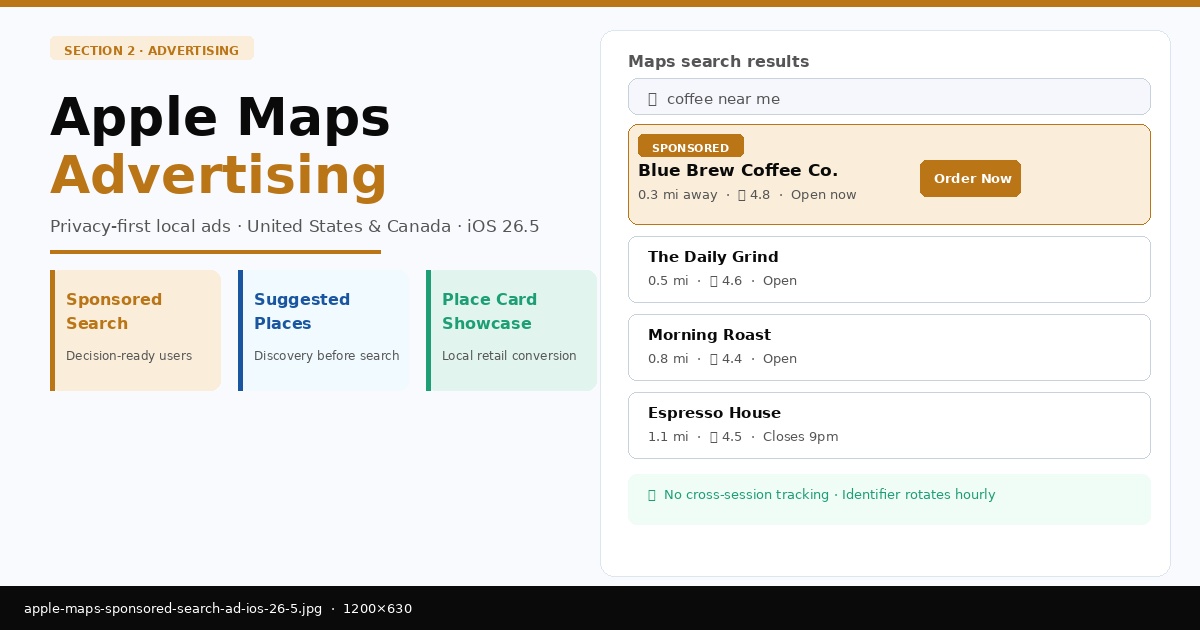
Rather than tracking individual location history over time, Apple’s Maps ad system targets based on what a user is actively doing at that exact moment — not who they are across weeks of behavioral data.
iOS 26.5 formally launches Apple Maps advertising in the United States and Canada. The targeting approach differs fundamentally from Google Maps: no longitudinal profile, no cross-session tracking, no persistent user identifiers.
How Targeting Works
- Active intent: Ads surface based on words currently typed into Maps (e.g., “coffee near me”, “pharmacy open now”).
- Geographic context: Approximate location clustered at neighbourhood level — not precise GPS coordinates.
- Visual context: The area currently visible on screen as the user pans or zooms the map.
- Rotating identifiers: Random IDs cycle multiple times per hour, preventing advertisers from building persistent user profiles.
| Ad Placement | User Experience | Best For |
| Sponsored Search | Top of category search results | Capturing decision-ready users |
| Suggested Places | Trending / recommendation tabs | Discovery before explicit search |
| Place Card Showcase | Highlighted deal on a business profile | Local retail conversion |
| SaaS Opportunity iOS 26.5 lets businesses embed custom action buttons (“Reserve”, “Order”) directly on their Apple Maps Place Card, linking into third-party apps. For restaurant booking or healthcare appointment SaaS platforms, this creates a low-friction conversion funnel — user sees sponsored result → views showcase offer → completes transaction without leaving Maps. Map-based searches typically occur at the “bottom of the funnel,” minutes before a physical visit, making this placement significantly more valuable than upper-funnel display advertising. |
Reference Links:
3. Apple Business Platform — One Console for Enterprise
iOS 26.5 ships alongside a consolidated enterprise platform that merges Apple Business Essentials, Apple Business Manager, and Apple Business Connect into a single interface. The goal: eliminate the multi-tool overhead that IT administrators currently manage across three separate systems.
Managed Apple Accounts
The centrepiece feature is the Managed Apple Account — a cryptographically separated work identity that coexists on the same device as a personal Apple ID. Employees retain full personal privacy; organisations maintain complete control over corporate data. Neither identity can access the other’s data.
- Zero-Touch Deployment: Devices ship directly to employees pre-configured via “Blueprints.” On first boot, setup is automatic — no IT desk visit required.
- Identity Federation: Managed Apple Accounts auto-create and suspend based on changes in your Microsoft Entra ID or Google Workspace directory.
- Admin API: Programmatic device and user management at scale — essential for high-growth SaaS companies adding headcount quickly.
| Capability | Legacy Approach | Apple Business Platform |
| Device Management | Apple Business Essentials (separate tool) | Unified MDM with Blueprints + Admin APIs |
| Brand Management | Apple Business Connect (separate tool) | Brand profiles in Mail, Wallet, Maps |
| Identity / Auth | Apple Business Manager (separate tool) | Federation with Entra ID / Google Workspace |
| Customer Engagement | Manual listings, no analytics | Automated ads + location insights |
Branded Transactional Experiences
Companies can now extend their visual identity into OS-level surfaces. Logos appear in the Mail app header for transactional emails, increasing open rates and brand recognition. During Tap to Pay in-person transactions, the merchant’s logo displays on the payment screen. For fintech SaaS providers leveraging native iOS hardware, this delivers white-label quality without building a custom payment app.
Reference Links:
→ Apple Business Manager Overview (PDF)
→ Apple Business Essentials Guide
4. The “Liquid Glass” Performance Problem
iOS 26’s signature visual design — called “Liquid Glass” — uses real-time physics-based rendering to create depth, blur, and light refraction across the interface. It is visually striking. It also demands more GPU power than most 3D games.
| Performance Warning Independent testing on M4 Pro hardware found that opening the Notification Center with Liquid Glass active pushes GPU usage to ~40% and power draw to ~15W — comparable to running Asphalt 8 in full 3D mode. iPhone 17 Pro Max users have reported persistent device warmth during routine tasks like scrolling through an animated Messages background. |
| UI State | Approx. GPU Load | Power Draw |
| Idle home screen | 0–5% | ~3W |
| Notification Center (Liquid Glass active) | ~40% | ~15W |
| Asphalt 8 3D game (benchmark comparison) | ~26% | ~15W |
| Static background (Transparency Off) | ~20% | ~8W |
Enterprise Fix: Disable It via MDM
- Settings → Accessibility → Reduce Motion: Eliminates most animation overhead.
- Settings → Accessibility → Reduce Transparency: Removes blur layers — the single biggest win for battery life and thermal management.
- The Nielsen Norman Group flagged legibility issues with semitransparent layers producing “text on text” situations. Enterprise MDM Blueprints should enforce these settings by default.
Reference Links:
→ Apple Support: Reduce Motion Guide
→ Nielsen Norman Group: Transparency & Legibility
5. EU Compliance — Opening the Walled Garden
The EU Digital Markets Act required Apple to open iOS to third-party hardware interoperability. iOS 26.5 delivers on this mandate — but only inside EU member states, enforced via geographic and account-level fencing.
- Proximity Pairing: Third-party earbuds and smartwatches can now initiate one-tap pairing, similar to the AirPods experience.
- Notification Mirroring: Non-Apple wearables in the EU can receive and display iPhone notifications for the first time.
- Live Activity Forwarding: Third-party accessories can now show real-time Live Activities (flight status, sports scores) on their displays.
| Brazil Expansion Signal Similar groundwork for sideloading and third-party app marketplaces has been found in the iOS 26.5 codebase targeting Brazil — suggesting Apple is building a modular OS that can toggle regional compliance rules per local legislation, rather than maintaining separate regional OS builds. |
Reference Links:
→ EU Digital Markets Act — Official Site
→ Apple DMA Compliance Document (PDF)
6. Attribution in a Privacy-First World
For mobile marketers, iOS 26.5 deepens the “signal loss era.” Apple’s own attribution tools gain precision while third-party behavioral tracking continues to lose ground. Two complementary frameworks now define measurement.
- AdAttributionKit (successor to SKAdNetwork): Delivers aggregated install data with crowd anonymity — no individual-level signals.
- AdServices Attribution API: Keyword and campaign-level data is available, but only for users who explicitly opted in via the App Tracking Transparency (ATT) prompt.
| Attribution Type | Data Granularity | Privacy Mechanism |
| Standard Payload | Install counts only | No timestamps, no engagement time |
| Detailed Payload | Keyword / AdGroup level | Requires explicit ATT consent |
| AdAttributionKit | Aggregated | Tiered anonymity thresholds |
| Platform Revenue Impact Early analysis suggests identifier-dependent platforms like Mailchimp and HubSpot could see 10–12% drops in abandonment attribution as iOS 26.5 further restricts fingerprinting and persistent identifiers across the ecosystem. |
The “Screen Unknown Senders” Challenge
With more than 50% of users expected to enable this filter, any promotional message from a brand not saved in the user’s contacts is silently routed to a secondary folder with no notification. “Known Sender” status is now the premium metric in mobile marketing.
- Contact Card Integration: Encourage users to download a VCF contact card via an early MMS message — future messages then bypass filters automatically.
- Tone Shift: Urgent, sales-heavy language (“SALE NOW”, “LAST CHANCE”) is flagged by on-device classifiers into Promotions folders. Conversational tone performs significantly better.
- Two-Way Engagement: Apple’s filtering logic rewards active threads. Brands that successfully elicit replies receive higher ongoing visibility.
Reference Links:
→ AdServices Attribution API Docs
→ Apple App Tracking Transparency Overview
7. What Comes Next: iOS 27 and the AI Transition
The absence of major Apple Intelligence or Siri features in iOS 26.5 is deliberate. Apple is reserving these for the WWDC 2026 announcement. iOS 26.5 is functioning as a stability and infrastructure layer — hardening the foundations before a significant AI-driven paradigm shift arrives later in 2026.
| Legacy Device Notice for IT Teams iOS 26.5 may be the last stable release for iPhone 11 and the second-generation iPhone SE. iOS 27 is expected to require on-device NPU (Neural Processing Unit) capabilities that these hardware generations cannot provide. Enterprise IT teams managing older device fleets should treat iOS 26.5 as their long-term security baseline for those devices and plan procurement accordingly. |
Recommended Actions Before iOS 27
- Audit all managed devices now and apply iOS 26.5 to ensure E2EE RCS support and access to the unified Apple Business platform.
- Identify the share of your fleet running iPhone 11 or iPhone SE Gen 2 before iOS 27 drops support for those models.
- Begin building “Known Sender” status immediately — contact card campaigns, two-way SMS flows, and tone adjustments require lead time to deploy at scale.
- Enforce Reduce Motion and Reduce Transparency via MDM Blueprint to resolve Liquid Glass battery and thermal issues across your fleet.
Reference Links:
| Conclusion iOS 26.5 is a professionalisation update. Encrypted RCS closes the largest cross-platform security gap in mobile history. Apple Maps Ads introduces a discovery-based revenue model that sidesteps the privacy pitfalls of behavioral tracking. The unified Apple Business platform gives IT teams a single console where three used to exist. And the Liquid Glass performance issues, while real, have straightforward MDM-enforceable workarounds. The trajectory is clear: the iPhone is moving from consumer device to cryptographically secure enterprise terminal — and iOS 27’s AI features will accelerate that shift further. |
 Ghulam Fareed